Recommendations
Recommendations are automatic optimization suggestions that help improve efficiency and reduce costs. Each provider uses its own tools and methods to evaluate resource usage and suggest adjustments.
Optimization recommendations are displayed in descending order on the platform, starting with those that offer the highest potential for cost reduction and following with those of lesser impact.
For each recommendation, two main pieces of information are provided:
-
Total potential reduction → Shows the estimated value that can be saved if the recommendation is implemented.
-
Number of applicable recommendations → Indicates the number of actions that can be taken to achieve this reduction.
Important
The platform specializes in FinOps, an approach focused on optimization and efficient management of cloud costs. Therefore, cost optimization recommendations provided by the providers are prioritized, aiming for actions with the most direct impact on the budget.
Providers
Recommender → It is a service that provides actionable recommendations to optimize the use and costs of cloud resources. Recommendations include suggestions for:
- Reducing costs by identifying unused or underutilized resources.
- Adjusting virtual machine sizes, autoscaling, and storage policies to save money.
AWS Trusted Advisor → Offers recommendations based on five main areas, with a focus on cost optimization.
- Identifies unused or underutilized resources, such as reserved instances or idle storage volumes.
- Suggests adjustments to service configurations to reduce operational expenses.
Azure Advisor → Provides personalized recommendations to improve cost efficiency.
- Identifies underutilized or reducible resources, such as virtual machine sizes or disk configurations.
- Proposes changes to align usage with the defined budget.
Data Loading
Loading and updates of billing data
Data is collected on a daily basis at 08:00 (America/Sao Paulo).
Prerequisites for the flow to occur correctly:
 Recommendation service configured and enabled in the provider.
 Service Account registered in the integration must have read permissions for recommendations in the provider.
When a recommendation is applied by the user, it is automatically removed from the listing. This happens because the provider periodically updates the status of recommendations, removing those that have already been effectively resolved from the active list.
Update Time
Each provider has a specific period for updating and synchronizing recommendations, which may impact the time needed for changes to be reflected on the platform.
Totals
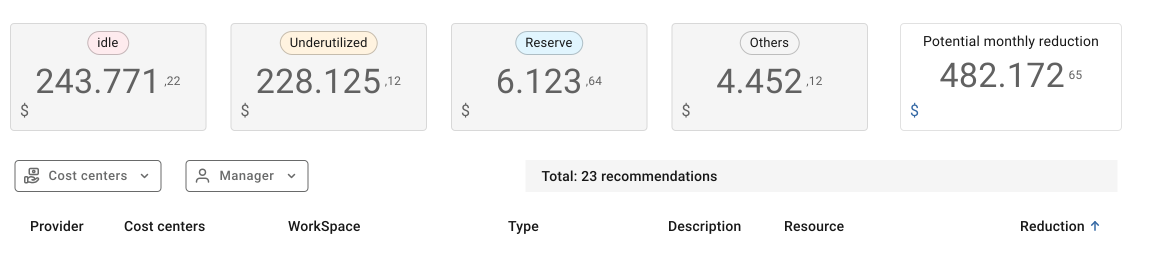
There are kinds of recommendations: idle, underutilized, reservation and others. Each one offer an opportunity for cost reduction when implemented. More details about them can be found on the section below.
-
Idle → Potential cost savings when implementing 'Idle' type recommendations.
-
Underutilized → Potential cost savings when implementing 'Underutilized' type recommendations.
-
Reservation → Potential cost savings when implementing 'Reservation' type recommendations.
-
Others → Potential cost savings when implementing 'Others' type recommendations.
-
Potential monthly reduction → Potential cost savings when implementing all recommended actions.
-
Total → Total number of recommendations.
Columns
-
Provider → Name of the service provider.
-
Cost Center → Name of the Cost Center / Cost Center Code.
-
Workspace → Name of the Workspace / Workspace ID.
-
Type → Type of recommendation.
-
Description → Details of the action to be taken.
-
Resource → Target resource of the recommendation.
-
Reduction → Potential cost savings when implementing the recommended action.
Filters
-
Provider → Cloud service provider.
-
Cost Center → Name/Code of the Cost Center.
-
Manager → Responsible for the Cost Center.
Types of Recommendations
The recommendation service contains the following four types:
-
Idle
Refers to resources that are inactive or with usage well below their total capacity. These resources are generating costs but with little or no workload.
Example: A virtual machine that was provisioned but is not performing any tasks, or a database that is not processing queries frequently.
-
Underutilized
Refers to resources that are in use but with capacity far above what is necessary for the workload. These resources could be redirected to a smaller and more economical configuration without impacting performance.
Example: A virtual machine instance configured with high CPU and memory capacity but using only a small fraction of these resources.
-
Reservation
Refers to a pre-purchase or allocation of resources for a specific period in exchange for a significant discount on the cost.
Example: A virtual machine instance with stable and predictable workloads, where resource consumption is stable, allowing for cost optimization with discounts.
-
Others
Recommendations not classified in the listed types above.